Exercise 1
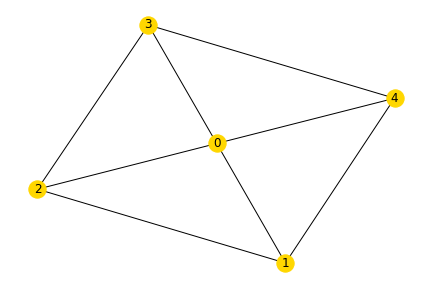
Task 1: Build the graph shown above in networkx using the functions to add graphs. The weight of each edge should correspond to the sum of the node labels it connects.
Notebook Cell
import networkx as nxNotebook Cell
G = nx.Graph()Notebook Cell
edges = [
    (0, 1, dict(weight=1)),
    (0, 2, dict(weight=2)),
    (0, 3, dict(weight=3)),
    (0, 4, dict(weight=4)),
    (1, 2, dict(weight=3)),
    (1, 4, dict(weight=5)),
    (2, 3, dict(weight=5)),
    (3, 4, dict(weight=7)),
]
Notebook Cell
G.add_edges_from(edges)Task 2: Draw the finished graph with matplotlib.
Notebook Cell
nx.draw(G, with_labels=True)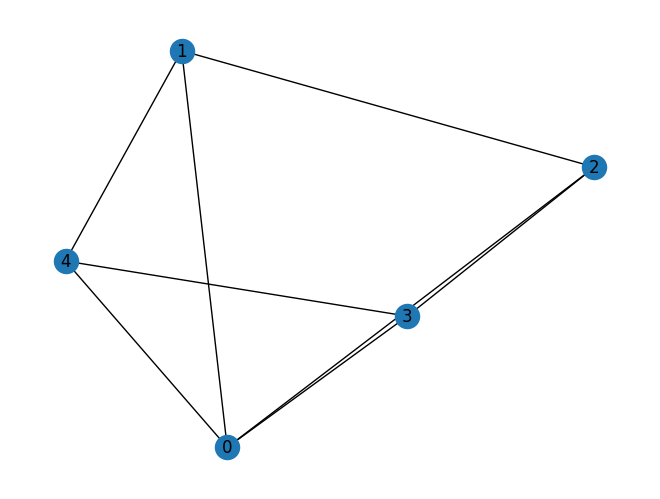
Exercise 2
Reconsider the example of the European transmission network graph. Use the following code in a fresh notebook to get started:
url = "https://tubcloud.tu-berlin.de/s/FmFrJkiWpg2QcQA/download/edges.csv"
edges = pd.read_csv(url, index_col=0)

G = nx.from_pandas_edgelist(edges, "bus0", "bus1", edge_attr=["x_pu", "s_nom"])

subgraphs = []
for c in nx.connected_components(G):
    subgraphs.append(G.subgraph(c).copy())
Choose one of the subgraphs (each representing a synchronous zone) and perform the following analyses:
Notebook Cell
import pandas as pd
import networkx as nx

url = "https://tubcloud.tu-berlin.de/s/FmFrJkiWpg2QcQA/download/edges.csv"
edges = pd.read_csv(url, index_col=0)

G = nx.from_pandas_edgelist(edges, "bus0", "bus1", edge_attr=["x_pu", "s_nom"])

subgraphs = []
for c in nx.connected_components(G):
    subgraphs.append(G.subgraph(c).copy())
Notebook Cell
G = subgraphs[3] # vary the subgraph hereTask 1: Determine the number of transmission lines and buses.
Notebook Cell
len(G.edges)408Notebook Cell
len(G.nodes)286Task 2: Check whether the network is planar.
Notebook Cell
nx.is_planar(G)FalseTask 3: Calculate the average number of transmission lines connecting to a bus.
Notebook Cell
pd.Series({k: v for k, v in G.degree}).mean()np.float64(2.8531468531468533)Task 4: Determine the number of cycles forming the cycle basis.
Notebook Cell
len(nx.cycle_basis(G))123Task 5: Create a histogram of the length of the cycles (i.e. number of edges per cycle) in the cycle basis.
Notebook Cell
cycle_length = pd.Series([len(c) for c in nx.cycle_basis(G)])Notebook Cell
cycle_length.plot.hist(bins=100);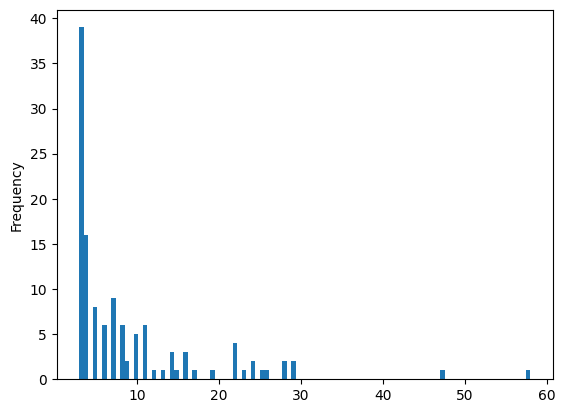
Notebook Cell
# alternative
pd.Series([len(c) for c in nx.cycle_basis(G)]).value_counts().sort_index().plot();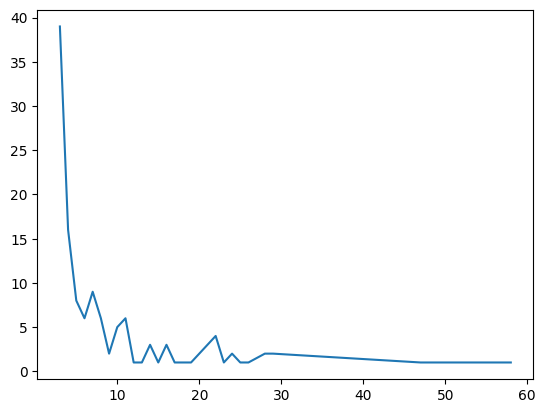
Task 6: Calculate the average length of the cycles in the cycle basis.
Notebook Cell
cycle_length.describe()count 123.000000
mean 8.918699
std 8.933813
min 3.000000
25% 3.000000
50% 5.000000
75% 11.000000
max 58.000000
dtype: float64Task 7: Obtain the directed adjacency matrix.
Notebook Cell
nx.adjacency_matrix(G).todense()array([[0, 0, 0, ..., 0, 0, 0],
[0, 0, 0, ..., 0, 0, 0],
[0, 0, 0, ..., 0, 0, 0],
...,
[0, 0, 0, ..., 0, 0, 0],
[0, 0, 0, ..., 0, 0, 0],
[0, 0, 0, ..., 0, 0, 0]], shape=(286, 286))Task 8: Obtain the directed incidence matrix.
Notebook Cell
K = nx.incidence_matrix(G).todense()
K
array([[1., 1., 0., ..., 0., 0., 0.],
[0., 0., 1., ..., 0., 0., 0.],
[0., 0., 0., ..., 0., 0., 0.],
...,
[0., 0., 0., ..., 0., 0., 0.],
[0., 0., 0., ..., 0., 0., 0.],
[0., 0., 0., ..., 0., 0., 0.]], shape=(286, 408))